
Solar Battery Not Charging Fully? 7 Possible Causes and How to Fix It in Nigeria (2026/27)
Is your solar battery stopping at 70%, 80% or 90%, or running down too quickly at night? Discover common causes, safe checks you can make and when a professional solar inspection is needed.
- Favour Otaigbe
- Updated
- 11 min read
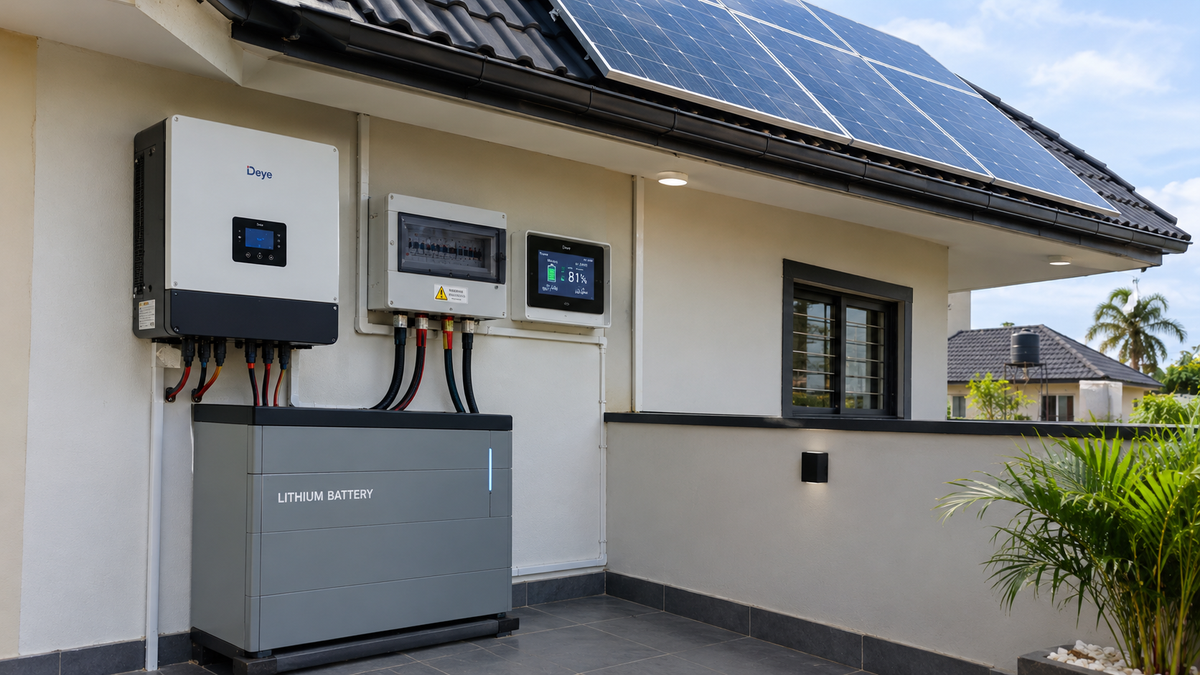
Your solar panels are receiving sunlight, but your inverter battery still stops at 70%, 80% or 90%. Perhaps it reaches 100% occasionally but runs down much faster than expected at night.
Before buying another battery or replacing your inverter, find out what is actually happening. The problem may be insufficient solar generation, heavy daytime electricity use, incorrect charging settings, dust or shading, or a battery-related fault.
This guide explains seven possible causes, safe checks you can make, and when to contact a qualified solar installer.
Quick answer: why is your solar battery not charging fully?
Common causes include:
Your appliances are consuming most of the electricity generated during the day.
Your solar panels are producing less energy because of cloud cover, dirt or shading.
Your inverter or charge controller is using a charging setting that does not match the battery.
The battery management system is restricting charging or reporting a warning.
The battery percentage displayed by the inverter is inaccurate.
The battery, charging circuit or associated connections may have a fault.
Your solar system may not produce enough energy to meet your daily consumption and recharge the battery.
These are possibilities, not confirmed diagnoses. Start with the information displayed by your system, compare energy production with consumption, and avoid changing electrical settings without checking the equipment manuals.
1. Your appliances are using too much solar power during the day
One common explanation is that your solar system is generating electricity, but your appliances are consuming most of it before the battery can recharge.
For example, an air conditioner, freezer, borehole pump, electric iron or several appliances running together can consume a substantial amount of power. The available surplus may not be enough to refill a partially discharged battery before sunset.
What you can check
Observe the solar power, battery charging power and household load shown on your inverter or monitoring app.
Temporarily switch off non-essential appliances using their ordinary controls, provided doing so is safe.
Observe whether battery charging improves while sunlight remains reasonably steady.
Compare readings at similar times on different days rather than relying on one observation.
If charging improves when optional loads are reduced, daytime consumption may be contributing to the problem. It does not, by itself, prove that the battery is healthy.
What can help: Stagger high-power appliances, reduce unnecessary daytime consumption and ask your installer to assess whether your solar array is appropriately sized for your usage.
2. Your solar panels are producing less electricity than expected
Bright sunshine does not guarantee that your panels are delivering their expected output. Several factors can reduce production:
Dust, bird droppings or other dirt on the panel surface.
Shadows from trees, buildings, aerials or nearby structures.
Cloud cover or atmospheric haze.
Panel orientation, installation or equipment limitations.
A fault involving a panel, connector, cable or other system component.
In Nigeria, dusty conditions can make panel inspection particularly relevant during the dry season. However, do not assume that seasonal dust is the cause without checking the actual readings.
What you can check
From a safe position on the ground, look for visible dirt, new shadows or obvious damage. If your inverter or monitoring app records daily solar generation, compare several complete days with similar weather conditions.
Do not climb onto a roof or touch solar connectors to investigate a suspected problem.
What can help: Arrange appropriate panel cleaning where necessary and have an installer investigate persistently low output. Follow the panel manufacturer's cleaning instructions; dry scraping, abrasive tools and unsafe roof access can damage equipment or injure you.
3. Your inverter's charging settings may not match your battery
Your inverter, charge controller and battery must work together using compatible charging parameters.
If the battery type, charging voltage, charging current or charging target is configured incorrectly, the system may stop charging too early, charge inefficiently or trigger a protective warning.
A battery that repeatedly stops at a similar percentage deserves investigation, especially if the behaviour began after an installation, repair or settings change.
What you can check
Record the battery type and model shown in your equipment documentation.
Photograph the inverter's charging status and any warning messages.
Note whether the problem started after a setting was changed or new equipment was installed.
Ask your installer to compare the existing configuration with the exact manuals for the inverter and battery.
Important: Do not copy charging voltages or menu settings from another installation. Safe values depend on the equipment models, battery chemistry and system configuration. Increasing the charging current will not create extra solar energy and can be unsafe if the equipment is not rated for it.
4. Your lithium battery's management system may be limiting charging
Many lithium batteries use a battery management system (BMS) to monitor conditions and protect the battery.
Depending on the battery and installation, a warning, temperature condition, cell-voltage limit or communication issue may affect whether charging is permitted.
A battery that stops charging at 80% or 90% is not automatically defective. The cause must be established from the equipment's status information and manufacturer guidance.
What you can check
Look for warnings in the battery's display or monitoring app, if available.
Photograph the battery and inverter displays together.
Record the exact warning and when it appeared.
Ask your installer to verify BMS communication, charging permissions and compatibility.
Do not bypass the battery management system or disable protective features to force the battery to 100%.
5. The displayed battery percentage may be inaccurate
The percentage shown on an inverter is an estimate of the battery's state of charge. Depending on the equipment, it may be calculated using voltage, current measurements, a battery monitor or information communicated by the battery management system.
Incorrect configuration, monitoring or communication can cause the displayed percentage to differ from the battery's actual condition.
For example, the display may reach 100% unusually quickly, jump between percentages or disagree with another monitoring screen.
What you can check
Compare the inverter and battery readings at the same time.
Record any sudden percentage changes or inconsistent readings.
Check whether the monitoring system reports communication warnings.
Ask your installer to verify the monitoring configuration and charging history.
Manually setting the display to 100% does not charge the battery or restore lost capacity.
6. The battery or another system component may have a fault
If the system is producing adequate energy, the settings appear appropriate and charging still behaves abnormally, a component fault may need investigation.
Possible causes include a battery with reduced usable capacity, a charging-circuit problem, a protective device issue, damaged equipment or a connection fault.
Different battery types require different assessment methods.
Lithium batteries: Review available battery-management warnings and request a suitable capacity assessment.
Flooded lead-acid batteries: Maintenance and testing must follow the manufacturer's instructions, including electrolyte checks where applicable.
AGM and gel batteries: These are sealed types and must not be opened or treated like refillable flooded batteries.
A battery that reaches full charge but runs down quickly may have reduced usable capacity, but heavy appliance consumption can produce similar symptoms.
What can help: Request a professional assessment of charging performance, battery condition and relevant system components before purchasing replacements. Battery age alone does not establish the cause.
7. Your solar system may be too small for your energy needs
Sometimes the system is operating normally but cannot generate enough electricity to power the daytime load and recharge the battery within the available sunlight.
Consider a simplified example:
A system generates 6 kWh of usable energy during the day. Household appliances and system losses account for 4 kWh. Approximately 2 kWh remains available for battery charging.
If the battery needs more than 2 kWh to return to its intended charge level, it may finish the day partially charged.
These figures are illustrative only. Actual generation and storage depend on panel capacity, sunlight, equipment efficiency, appliance demand, battery condition and charging limits.
Should you add more solar panels or another battery?
The right choice depends on the diagnosis.
If generation is insufficient, additional appropriately designed solar capacity may help, subject to controller and inverter limits.
If daytime appliances consume most of the generation, load management may be more useful.
If the battery is not accepting a charge correctly, adding another battery may not solve the problem.
If you need more stored energy for nighttime use and the system already generates sufficient surplus, additional compatible storage may be worth assessing.
Ask for a load assessment and system review before spending money on upgrades.
A simple checklist before calling a solar installer
Gather this information to make troubleshooting more useful:
Your location and when the problem started.
The inverter, battery and charge-controller makes and models, where applicable.
The number and rated wattage of your solar panels, if known.
The battery percentage in the morning and late afternoon.
Daily solar generation readings, if your system provides them.
The appliances running while the battery is supposed to be charging.
Any warning codes or messages shown by the equipment.
Recent maintenance, installation work or changes to settings.
Photographs and monitoring screenshots can help your installer understand the symptoms before visiting.
If you notice smoke, swelling, leaking electrolyte, a burning smell, melted insulation or visibly damaged electrical equipment, keep clear and arrange professional assistance. Do not open equipment, touch exposed conductors or attempt live electrical tests.
Frequently asked questions
Why is my solar battery not charging fully even when the sun is shining?
Your appliances may be consuming most of the energy generated, or the panels may be producing less than expected because of shading, dirt or other conditions. Charging settings, battery-management restrictions and equipment faults are also possible. Compare production, consumption and warning messages before deciding what needs repair.
Why does my lithium battery stop charging at 80% or 90%?
Possible causes include a configured charge target, insufficient charging time, an inaccurate state-of-charge reading or a battery-management restriction. Check the equipment's warnings and manuals, and ask your installer to investigate before changing charging settings.
Can dust or harmattan affect solar battery charging in Nigeria?
Dust on solar panels can reduce the sunlight reaching the cells and lower energy production. Atmospheric haze and weather conditions can also affect generation. The extent of the impact varies by location and installation, so compare your own generation readings rather than assuming a fixed percentage loss.
Should I increase the inverter charging current?
Not without confirming that the setting is compatible with the battery, inverter, charging source and associated equipment. Increasing the limit cannot create more solar energy and may be unsafe if the configuration exceeds the equipment's permitted limits.
Why does my battery show 100% but run down quickly at night?
The battery may be supplying more energy than expected, its usable capacity may have reduced, or the displayed percentage may be inaccurate. Compare nighttime consumption under similar conditions and request a battery assessment if the problem persists.
Should I buy another battery if my existing one never reaches 100%?
Not before investigating the cause. If the system lacks enough energy to recharge the existing battery, additional storage will not solve the generation shortfall. Establish whether the issue is related to production, consumption, charging configuration, monitoring or battery condition first.
When should I call a solar installer?
Arrange an assessment if the problem persists, charging stops unexpectedly, warning messages keep appearing, battery runtime has fallen significantly or you suspect an electrical fault. Seek immediate professional assistance if you notice smoke, swelling, burning smells or visibly damaged equipment.
Need help diagnosing your solar system?
A battery that does not charge fully is not necessarily a failed battery. The useful first step is to establish whether the problem comes from energy production, appliance demand, charging configuration, monitoring or equipment condition.
BrightForge Electrical & Security Ltd provides solar installation services in Benin City, Edo State. If your solar system is not charging as expected, you can contact us to discuss the symptoms and arrange an appropriate assessment.
Request a service enquiry: https://brightforge.ng/quote
Explore our services: https://brightforge.ng/services
Further reading and technical references
Victron Energy — MPPT solar charger troubleshooting: technical guidance on undercharging, charging stages and possible system causes.
Renogy — Solar charge-controller troubleshooting guide: guidance on low charging current, solar input and compatible battery settings.
SolarPriceNg — How to tell whether the battery or inverter is the problem: additional context on distinguishing battery symptoms from inverter or system issues.
Equipment-specific manuals take precedence over general online advice. This article is for general information and does not replace an on-site inspection or electrical testing by a qualified technician.
Need help with this at your property?
Tell us what you need and we'll get back to you during business hours. (Monday–Saturday, 8:00 AM–6:00 PM)